The saga of trying to build a IR controller. Uploaded September 25, 2026
April 29, 2026
I'm thinking some sort of a multipurpose IR/USB controller to control devices, or a portable keyboard I can bring with me anywhere.
Combines the following:
Cylindrical design, ergonomic? Split bottom?
For a first prototype, I should start small.
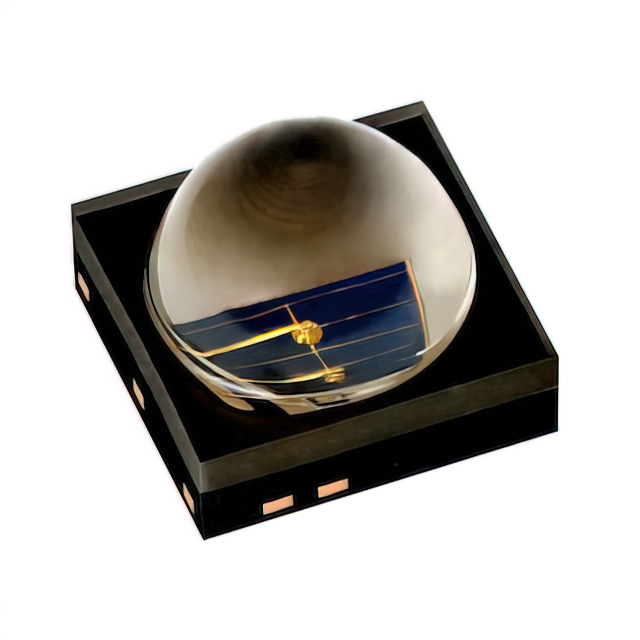
Inspired by sci-fi and fantasy concepts of universal tools and magical devices, I've always wanted to have a pocket device that can control IR devices over great distances, among other things. To do this, I plan to use a small microcontroller and a powerful IR LED that's several orders of magnitude more radiant than one found in a conventional TV remote, such as the following one from DigiKey:
For comparison, the radiant intensity of a regular IR LED from a TV remote is about 5 to 20 mW/sr (milliwatts per steradian). This one is 1660mW/sr at 1.5A.
I would like to add more features as well, such as remote USB HID emulation or 433 MHz radio playback, but starting simple is probably the best idea. For a first version, it would also be best to just use IR LEDs I've already extracted from Bins remotes just to test the concept.

IR Remote Wand universal remote control based on an ATtiny85. 🡵
From Technoblogy 🡵:
All the remote control protocols are based on a similar carrier frequency of between 36kHz and 40kHz; the exact frequency doesn't seem to be critical, so I chose a frequency of 38.5kHz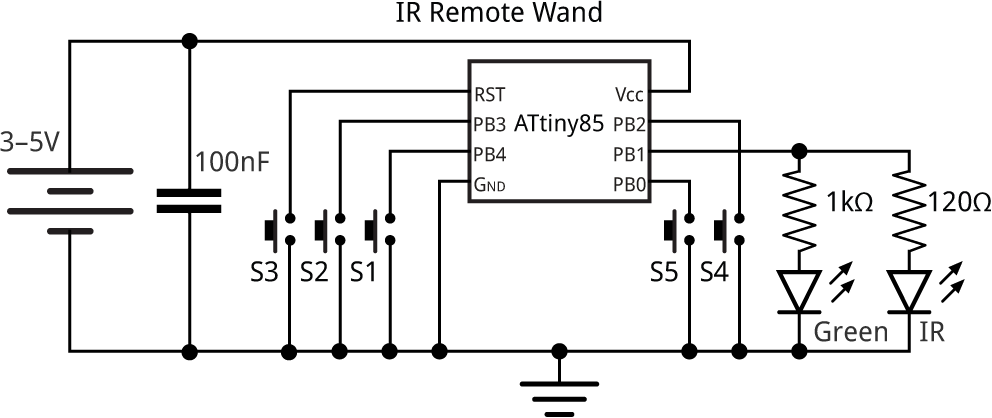
Circuit of the IR Remote Wand universal remote control. 🡵
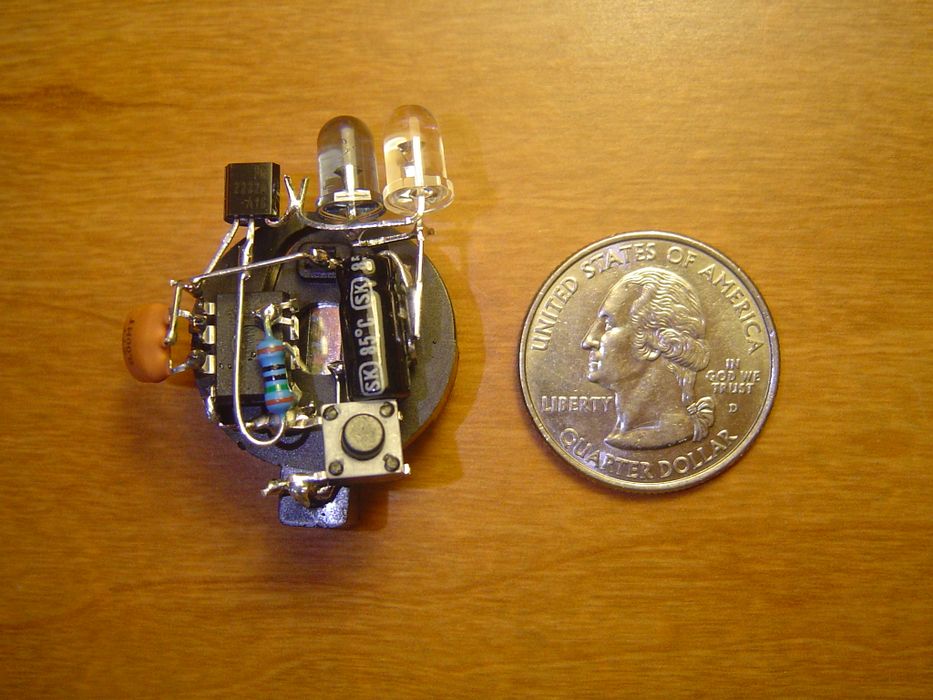
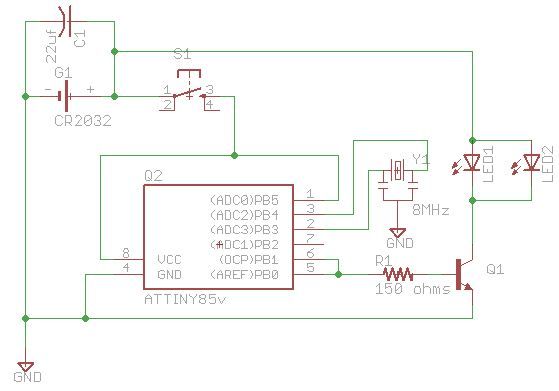
I should probably start with finding the infared codes I need to turn a TV on, since I can use the codes from the TV-B-Gone project to turn them off. To get Infrared codes, I found a database that seems to have the codes I want.
Excellent knowledge base for infrared controls.
April 30, 2026
I was able to get a PowerShell script that extracted the codes for me as a csv file: extract-power-codes.ps1, which can be run from the IRdb directory to generate a csv with only power on codes.
Link: Extracted Power On Codes
Example line from document:
POWER,NEC1,0,-1,31
From IRdb 🡵:
This database contains infrared remote control codes in a very space-efficient way, using protocol, device, subdevice, function notation. Using this information, you can render signals to raw timings, Pronto Hex, or other formats using software like IrScrutinizer 🡵 or MakeHex 🡵.So in each line, we have the command (POWER), the protocol (NEC1), and the code.
I ran into a problem converting to C for using in the ATtiny85 since it's not exactly ready to use just yet. The version used in the "TV-B-Gone" uses a table of raw pulse timings, that seems like a good idea for my use case as well. So, how to convert?
Seems to be the easiest since it has something of a frontend I can use. Maybe I could import my csv file here and convert it to timings?
After downloading the program from Releases 🡵 and installing, I found the import pane. I couldn't figure out how to import the .csv data I had though, but supposedly there's a method using a program called RemoteLocator?
While looking around on the website, I found this Database of Codes generated by Remote Locator 🡵, but it looks like something else that I would have to import and convert.
When it comes to RemoteLocator itself, unfortunately, it seems that it's a sort of java program, so I will need to install something extra to run it I think.
However, on the RemoteLocator website, I found a page of IR resources. It might be easier to find a better database to generate IR codes from.
Linked from here was something called the "MegaList", in a .cml format that supposedly can be directly imported into IR Scrutinizer
Found on RemoteCentral.com, which is a very charming old website. I like that they list estimated download time for dialup.
Size: 5.95mbAnyway, this gave us a .CML file that we can supposedly upload into our IrScrutinizer program. Unfortunately, when I attempted to import it into IrScrutinizer, the program hung indefinitely.
If I wanted to send information using a library instead of having to turn the data into raw pulse timings, this seems to be the standard library used for sending IR signals with Arduino. It's possible this would be a better alternative. It also seems to support not just regular NEC codes 🡵, but NEC2 codes as well.
The library GitHub has some examples, namely SendDemo.ino 🡵 which "Sends all available protocols at least once."
While it might be worth a try, I think it would be best to first start with the same method used by the used in the TV-B-Gone script, which is converting to raw pulse timings.
While the main program is about reading .IRP files, it also contains another program called Encode IR.
EncodeIR: This program takes device, subdevice, and function and outputs timing information in raw format.Example:
$ ./encodeir NECx1 0 191 1
turns into:
4512 4512 564 564 564 564 564 564 564 564 564 564 564 564 564 564 564 564 564 564 564 564 564 564 564 564 564 564 564 564 564 564 564 564 564 1692 564 564 564 564 564 564 564 564 564 564 564 564 564 564 564 564 564 1692 564 1692 564 1692 564 1692 564 1692 564 1692 564 1692 564 43992 4512 4512 564 1692 564 95880
The GitHub repository seems to be in C++, so it looks like I will have to compile it.
This took some additional research but I was able to figure it out: Creating Executable from C++ Repository in Windows
With EncodeIR successfully compiled, I can test it with the codes I've collected.
For example, the line rc5 28 -1 12 turns into the expected set of hex codes: 889 889 1778 1778 889 889 889 889 1778 889 889 889 889 889 889 1778 889 889 1778 889 889 90678.
RC5 will return Error: Unknown protocol. rc5 works fine though.
This means I will have to convert my file into something that's all lowercase before feeding it into encodeir.
Using a PowerShell script convert-to-timing.ps1 with the following command format:
.\convert-to-timing.ps1 "C:\Users\user\Downloads\irdb-master\irdb-master\FilteredPowerCodes.csv" "C:\Users\user\Downloads\MakeHex-master\MakeHex-master\encodeir.exe"
Even though I have the timings, I have to convert them into a format that is good for Arduino code. The hex timing is just a series of on and off delays, so I must convert that into something I can insert into the code format of the TV-B-Gone.
progmem to be used in an Arduino scriptFrom IR Remote Control Theory 🡵:
Modulation of the signal on a carrier frequency is the answer to make our signal stand out above the noise. With modulation we make the IR light source blink in a particular frequency. The IR receiver will be tuned to that frequency, so it can ignore everything else.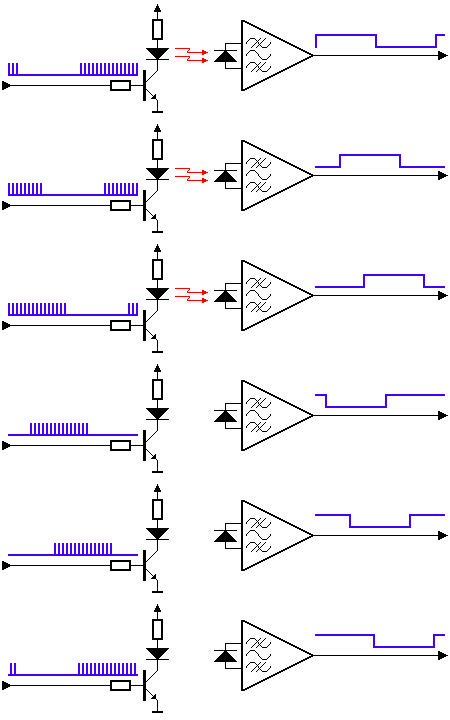
"In the picture above you can see a modulated signal driving the IR LED of the transmitter on the left side. The detected signal is coming out of the receiver at the other side." - from IR Remote Control Theory 🡵
From the article:
All the remote control protocols are based on a similar carrier frequency of between 36kHz and 40kHz; the exact frequency doesn't seem to be critical, so I chose a frequency of 38.5kHz; this is generated on OC1A (PB1) using Timer/Counter1. The mark/space ratio is set to about 25%, which reduces the current consumption of the IR LED:Link: Initial Arduino Code for IR Transmission
With a possible code method, the next step is to take the codes I have and turn them into tables that I can load to progmem for my Arduino code. A powershell script can be used to accomplish this: convert-to-array.ps1
The IDE for Arduino projects can be downloaded on the Arduino website 🡵 and installed. Once opened for the first time, it prompts you to install a bunch of various dependencies and drivers. Once the process has finished, we should be all set to add our code.
I should be able to just combine the code generated by the array converter and the sample code from earlier into a final script.
This results in our first rendition of the Arduino IR Controller Code v1:
It seems like we need to select a board first, so we'll borrow from the programming section to figure this out.
!Using an Arduino to Program ATtiny85#2. Adding ATtiny85 Support to Arduino IDE
Afterwards, we can now compile. This results in our first error:
c:/users/games/appdata/local/arduino15/packages/arduino/tools/avr-gcc/7.3.0-atmel3.6.1-arduino7/bin/../lib/gcc/avr/7.3.0/../../../../avr/bin/ld.exe: C:\Users\Games\AppData\Local\arduino\sketches\1351025D86CE66A69C365AE94F31DCF2/sketch_may1a.ino.elf section `.text' will not fit in region `text'
c:/users/games/appdata/local/arduino15/packages/arduino/tools/avr-gcc/7.3.0-atmel3.6.1-arduino7/bin/../lib/gcc/avr/7.3.0/../../../../avr/bin/ld.exe: region `text' overflowed by 2186 bytes
collect2.exe: error: ld returned 1 exit status
exit status 1

Compilation error: exit status 1
As it turns out, we still don't have quite as much space as we hoped for on the ATtiny, which is problematic, especially if we want to store all of the "OFF" codes as well. It makes me curious how the original ATtiny TV-B-Gone code does it. After taking a look, I see that the TV-B-Gone only uses 52 codes vs the 81 I'm using in mine. Maybe we can optimize the size?
Apparently I can compress the data into a so-called uint8_t array, a sort of compression that should half the storage required for each value by finding the smallest timing in each code, divides all other numbers by that unit, and stores the multipliers. An updated PowerShell script,
Compress-IRCodes.ps1, can be used to generate a new list.
This requires an updated Arduino code that will "unpack" these values as they are needed though.
This fails with a new message:
Sketch uses 6054 bytes (295%) of program storage space. Maximum is 2048 bytes.
Global variables use 253 bytes (197%) of dynamic memory, leaving -125 bytes for local variables. Maximum is 128 bytes.
Sketch too big; see https://support.arduino.cc/hc/en-us/articles/360013825179 for tips on reducing it.
text section exceeds available space in board

Compilation error: text section exceeds available space in board
However, this shouldn't be an issue, since the ATtiny85 should have plenty of space, 8,192 bytes. Upon closer inspection, it becomes clear that we're attempting to compile for the ATtiny25.
This can be remedied by switching the processor in Tools -> Processor -> ATtiny85
After a third test compile, it looks like it was successful.
Sketch uses 6060 bytes (73%) of program storage space. Maximum is 8192 bytes.
Global variables use 253 bytes (49%) of dynamic memory, leaving 259 bytes for local variables. Maximum is 512 bytes.
I will have to see if a similar process works for the "OFF" codes as well.
Even if it's designed more for making PCBs, I think it would be good to use for designing the circuit, since it should have all the tools I need.
!Pasted image 20260501053219.png
Supposedly Diodes are a good way of preventing power from flowing backwards through the switch that's not in use.
Supposedly I also don't have to worry too much about sending power directly from the battery to a sensor pin, since a pin can safely handle $VCC + 0.5V$
I will need to use diodes if I don't want to get a ghost signal sent to the pin via electrical backflow. There might be power loss, but it's all good because a transistor allows the LEDs to be controlled directly from the battery.
Given that I don't have the parts to make a diode version of the circuit right now, I should start with a basic version. If it can turn on TVs, that's a great step forward.
The kit comes with an ample supply of 2N3904 transistors. However, it seems I still will need a resistor for the transistor to ATtiny connection.
For the ATtiny to Transistor connection, $150{\ohm}$ should be good. Supposedly it only needs enough to switch on, so something low like $150\ohm$ is going to send more power to the transistor than necessary, causing more power draw. A ${1\rm k}\ohm$ or $4.7\rm k\ohm$ resistor would be more efficient for switching, since it allows just enough flow to the transistor for it to switch on.
IR LEDs are supposedly designed to operate well at burst voltages, but I could use a $47\ohm$ resistor if I wanted to be more safe while still getting pretty high power results. I might want something more like $150\ohm$ for an indicator LED, since it doesn't have to be particularly all that high power.
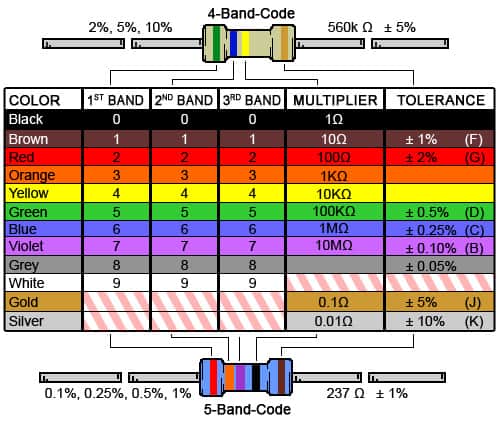
"This tool is used to decode information for color banded axial leas resistors. Select the number of bands, then their colors to determine the value and tolerance of the resistors." - from DigiKey 🡵
I can use a color reference chart, or I can use a multimeter. Probably best to check my work with a multimeter either way.
Next step is to acquire the missing parts: a $1-5\rm k\ohm$ resistor for the transistor, ~$50\rm k\ohm$ and $150\rm k\ohm$ resistors for the IR and status LED respectively, and diodes.
With those acquired, I can move on to attempting to program the ATtiny85
Normally, I would use the method described in "Using an Arduino to Program ATtiny85". However, I couldn't find the Arduino I used for it the last time I tried doing something like this, so I thought I'd explore more purpose-built alternatives instead of just buying another Arduino.
I acquired a AVR Programmer from Amazon 🡵 for this purpose.
With the AVR programmer I got, it seems I first have to install the firmware 🡵.
The first link didn't work, so I'll try Zadig 🡵, which is evidently a tool for easily installing USB drivers. This seemed to successfully install the drivers.
When I tried to burn the boatloader or upload the sketch, I received this error:
Error: cannot set sck period; please check for usbasp firmware update
Error: program enable: target does not answer (0x01)
Error: initialization failed  (rc = -1)
 - double check the connections and try again
 - use -B to set lower the bit clock frequency, e.g. -B 125kHz
 - use -F to override this check
Failed programming: uploading error: exit status 1
Supposedly this can be caused by cheap AVR programmers, requiring me to short JP3 to lower the clock speed to be compliant. I see another issue though. I've connected MISO to MISO and MOSI to MOSI. These should be reversed (Master In Slave Out).
Still the same error. Supposedly the libusbK driver is a better fit for this task. Installing it doesn't seem to produce results that are any different though.
I'm starting to think there might be a problem with the ATtiny itself. It's possible that attempting to flash with a non-existent external oscillator can get the ATtiny "stuck" in a way that only an external oscillator or 12v fuse-resetting programmer can fix.
The next step is to bring a few extra ATtinys to work and try swapping out the one I'm currently using to see if it makes a difference. However, this produced the same result
May 21, 2026
Looking into my issue more, it looks like the clock speed error might have to do with the USBasp firmware being out of date 🡵. Fortunately, it can be updated with a second USBasp. I guess it's a good thing that the Amazon one came as a pack of two.
Steps:
\usbasp.2011-05-28.tar\usbasp.2011-05-28\bin\firmwareavrdude -c usbasp -p m8 -U flash:w:usbasp.atmega8.2011-05-28.hex:iStill not working. Supposedly there's another firmware 🡵 I can try flashing, but I feel like it shouldn't be this difficult. Maybe I have to just throw more money at this and get a more expensive programmer, like the Tiny AVR Programmer 🡵 for $16.99, or find a more "normal" Arduino. I think I'll try returning the USBasp programmers and order some Arduino Nanos 🡵.
With the Nanos, it's even easier to program using my initial method since the ones I got have headers preinstalled, so I can just plop the whole thing onto a breadboard. As it turns out, one of my ATtiny's was indeed faulty.
May 30, 2026
Having solved my problem with some Arduino Nanos, the next step is to verify that I'm generating the infrared signal that I want. I got a combination component tester and oscilloscope that seems to also have an IR decoder built in, and while it seems like it will work great for decoding IR, it was also $65.
I might want to look into their older, smaller, and cheaper component testers which have IR, and see what I might be missing, since it might be better to have a more featured oscilloscope multimeter and a separate "sanity check" component tester.
Using the scope, I can see that I am getting somewhat of a square wave on the base of the transistor. This is good! However, looking at 50uS, I can see that my carrier frequency is 9.8kHz instead of the expected 38kHz, implying that my ATtiny is running at 1MHz rather the correct 8MHz. Supposedly, this can be resolved by using "Burn Bootloader" in Arduino settings, which doesn't actually install a bootloader, but flips the internal hardware switch to run at 8MHz.
After installing the new bootloader and code, I'll try again.
$+$ to $RESET$ and $-$ to $GND$
It's sending codes! Using Arduino IR Controller Code v2. However, it's not being detected by TVs. I'll try adding more of a delay in between the codes being sent.
June 6, 2026
Seems that adjusting the timing isn't enough for the IR codes to get received by the TV properly. Next will be sending the codes repeatedly, since I let the loop run until it got to the point where there was enough space in between each code that I could just replay the code. The frequency should be about right, I can't imagine that being the issue.
Sure enough, repeating each code twice seemed to do the trick. Now it turns on TVs! Time to start assembling a final prototype.
Making Rock Casts from Real Rocks 🡵
Corrugated Plastic works well for casting, can be found at Home Depot or similar. Hot glue to set.
Even for a rough first prototype, I still want to be able to modify my code later or update it. However, this is an entirely independent problem from how to power it. Obviously, if the rest of the components are encased in resin, the power receptacle and the microcontroller socket must still be exposed. However, during normal operation, it would be undesirable for the microcontroller to be exposed to the elements.
Additionally, the issue with the battery design is important to figure out, but not necessarily something that should hold me up from completing the project. I mean, all I really need is like two AAA batteries or something. I'd like to have a smart chargeable lithium battery solution, or some threaded doodad that I can replace batteries in, but that can happen later.
I was thinking about just making a gem thing with a USB-C socket, so I could just plug in a cable and power it that way, and that's when the solution hit me. If I want flexibility in how I power it, but still want to have something done, why don't I just separate the power and the gem/logic? This would allow me to take advantage of the natural durability of a USB-C socket for inserting the gem and fixing it securely, allow me to update firmware if necessary, and give me flexibility in how I might want to redesign the power base later. Additionally, since I'll have two data pins to work with thanks to USB-C, I can always add smarter switching logic to the same controller later, like if I wanted to add multiple buttons or something. For the first version, I'll just have it be power toggled, but a later battery version might be better always switched on with additional options. Designing each part separately gives me the flexibility for both, while still letting me play around with different functions even after I've encased the components.
If it gets to a point where it's standardized, one could imagine having different modules you could choose depending on what you want to do. After all, it probably doesn't make much sense to throw out the whole thing if the logic gets updated, since the battery is still going to be perfectly fine.
Since all the thinking happens in the crystal, it would be fun to also be able to experiment with other form factors for the battery as well, or more advanced control options, all that still have this cool looking magic Crystal sticking out the side of it
For future versions, I think it would be fun to have some sort of a motion control system, where you could tilt the wand in different directions to select different functions. I think I would want to be a system where tilting it in a direction selects a function, but to actually use it you still have to press the button. This would avoid awkward instances where you would otherwise select a function, like turning down the volume, but, in doing so, point the wand away from the target. Using an RGB LED would certainly help with keeping track of what is selected, and maybe there can be something of a color system where it would mimic the directional behavior of a color wheel picker, since many of those seem to be somewhat standardized, so that the colors and their associated directions are not entirely at random. It would also make for a fun effect if one were to press the button that enables directional selection and then just rotate through all the options in a circle, creating a sort of rainbow effect.
For more advanced function tracking, I would also like to avoid using screens if at all possible. I might make an exception for a small bubble eight segment display or something. Basic quick modes would be nice, as well as the ability to be more precise, like using only air conditioner codes or projector codes. In this way, it would function as a sort of super stylish universal remote, except ideally with a ton more broadcasting power. After that, it would be fun to embed additional features, such as a small torch light kind of thing, a laser pointer for pointing at things, and maybe some radio features. Perhaps a small joystick button would also be a good choice for more reliable input. Morse code input might be even better.
"Always clean on brass wool, then tin the tip and THEN onto the stand. When you take it out, fresh solder, clean on the brass wool and tin again immediately."
There are a number of parts to acquire in order to build a final product. Some things, like rotary switches and the like, are more straightforward. Others, like capacitors and MOSFETS, are less so. I'll start with putting together a list of components for purchase, ideally from DigiKey.
June 12, 2026
So far so good with the project. I've been able to solder together the parts used in the breadboard to make a small compact version of the same circuit, that can be powered off 5V via USB-C. The plan is for the battery compartment to connect to the main module via a USB-C adapter, as to eliminate the need for complicated docking methods, and to allow the device to work in a pinch even if the handle is non-functional (or not designed yet!).
It seems like the next thing for me to do will be figuring out how to both power and wire the led light bars that I got as indicators. They're not quite as bright as I would have hoped, and they're a little bit segmented as well in that you can see the little LEDs inside, but they're a budget buy with no datasheet, so I can't be too surprised. Finding out how to hook them up is going to be the most important thing, since it also seems like they only operate on 3 volts. I have to make sure that I'm keeping the voltage for the project consistent, though I'd rather design things around higher power, and USB-C power, than design for a lower 3.3v design that I wouldn't want to keep doing long term. I think the next challenge after that will be how to get the battery stuff to work, but I'm figuring I might be able to just take two of those AAA style lithium batteries and put those together in series, where they would be able to get me the voltage I need. I should also look more into what the battery charger requires and expects for voltages, since I'm under the impression that it should handle the consistent voltage output for me without me needing to really do any extra work.
At 5V, I can use a 150Ohm resistor to lower the voltage.
Maybe in a future build, I could use a address register and a bunch of really tiny LEDs to make sort of a directional pulse effect
^latest
