
April 24, 2026
The new motherboard, found on eBay
As it turns out, the CPU I have on the current work PC—random HP tower I found at the Bins—is actually pretty acceptable for basic performance. Combined with a GTX 1660 and an SSD that I don't remember installing (winning!), the performance seems to be quite adequate for basic productivity tasks. The only bottleneck is memory. I'm aware my browsing habits rival AI in terms of memory usage, so I had been keeping an eye on memory usage. Looking at 6GB usage out of 7.8GB total, I thought I was doing pretty well at keeping things managed, surprisingly.
Then I noticed my pagefile was sitting at 22GB. Whoops.
The problem is twofold. It's DDR3 memory and I only have two slots...and one of them might be a little broken. Even two slots wouldn't be so bad if it was DDR4, since I happen to have two DDR4 8GB sticks from The Bins laying around, but alas. However, that gave me an idea. What if I just swapped the motherboard to one that could use DDR4?
I started with a quick look on eBay and Facebook Marketplace. Amidst a sea of overpriced boards, I found someone selling a "parts PC" for a fine price. It just wasn't clear what exactly those parts were. He claimed it was an AMD CPU, and I was inclined to believe him at first, but after squinting at his blurry photos and doing some extensive Googling of parts numbers and comparing image results, not only did I learn about the concept of CPU sockets, but it became painfully obvious that the board he was selling didn't have a AMD CPU at all, and it was also just going to be another DDR3 board. To the trained eye, the big blue "INTEL" CPU cooler would have been a dead giveaway, but I figured he was using an Intel cooler just because—at least before I learned about the differences between AMD and Intel mounting brackets.
So, $60 for the opportunity to gamble on getting a better CPU than the i7 I already had, and some RAM sticks. It was starting to look like I was just going to end up spending a bunch of time and money on some outdated RAM. I thought I'd see if there were any compatible DDR4 boards for the LGA1151 CPU I had, but according to PC part picker, it didn't seem like there was.
In a last attempt to find something worthwhile, I tried searching on eBay for motherboards that would have that socket and DDR4. Surprisingly, I found hundreds of results, many of which were under $20! Of course! Just because there weren't really any consumer boards sold individually, there's no reason there wouldn't be OEM boards with those specs sold in pre-built consumer PCs!
Now, to find the right board in a sea of green. Very quickly, I discovered that many of these boards were not standard sizes. Without any better options, I just kept scrolling until I found one that seemed relatively regularly square-shaped. The next step was to see if it really was possible to do a case swap, and fortunately I found a Reddit thread asking the same question. Unfortunately, the answer was no. Despite the board's standard ATX appearance, it was a proprietary format. However, returning to search results, I found a video 🡵 describing a case swap with a similar board. Turns out, there was a model that was a standard ATX board, and now I had prior research for my own project.
The best part? It's an easy to find board for only $18. "
So here's the plan:
I should end up with something pretty compact, performant, cheap, and fairly professional.

The Lian Li A3 in Walnut
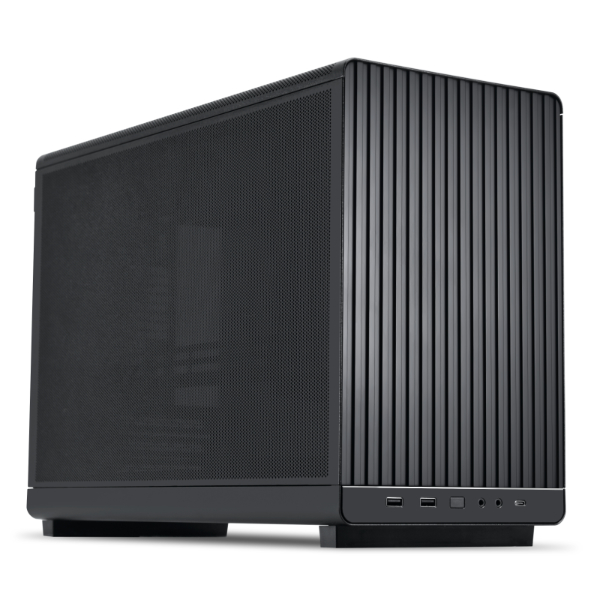
The Lian Li A3 in black, about $10 cheaper than the wood
April 25, 2026
After thinking about it and doing some more research, I found that it looks like there actually is some boards out there that I can use with my current CPU, while still being compatible with DDR4 RAM. Given the potential effort involved in refitting a board from another computer, I think it might be worth the extra ten or twenty dollars to just get something that's a little bit more conventional. The hard part is finding which ones specifically are ones that can work. Fortunately, I've started a list of potential candidates, based on how cheaply they can be found.
I'd like to have something that has 4 RAM slots, but I also know that I don't even have 4 RAM sticks to begin with. I know I might want to upgrade sometime in the future, but I'm also not sure that I want to spend all my money and effort into a PC build that's still ultimately going to be one that I keep at work. If I'm going to go through the effort of finding a more "future-proof" board, I probably would want to do that for my PC at home. That said, here are my options:
Evidently a bitcoin mining board from yesteryear.
Available Price: $30.84 OBO 🡵
DIMM Slots: 2
Expansion: 1 PCIe 3.0 x16, 12 PCIe 2.0 x1
Storage: 4 SATA3, 1 M.2 (SATA3)
USB: 4 USB 3.1 Gen1 (2 Front, 2 Rear)
Available Price: $49.00 🡵
DIMM Slots: 2
Expansion: 1 PCIe 3.0 x16, 2 PCIe x1
Storage: 4 SATA3
USB: 4 USB 3.1 Gen1 (2 Front, 2 Rear)
Available Price: $39.95 🡵
DIMM Slots: 4
Expansion: 1 PCI-E 3.0 x16 @ x16, 2 PCI-E 3.0 x1 @ x1, 1 PCI 5V @ 32-bit
Storage: 6x SATA3, 2x M2.2
USB: 2x USB 2 Type-A, 4x USB 3 Gen 1 Type-A, 2x USB 2 Header, 1x USB 3 Gen 1 Header
Available Price: $49.00 🡵
DIMM Slots: 2
Expansion: 1 PCIe 3.0 x16, 2 PCIe 2.0 x1
Storage: 4 SATA3
USB: 4 USB 3.1 Gen1 (2 Front, 2 Rear)
Given that I'd rather move the WiFi board from my current work computer into the new one so that I don't have to deal with new adapters, I think the best option I have is going for a board with M.2. It also means I'm covered in the case I decide to get NVMe storage, even though that seems unlikely given the current price of SSD storage nowadays. So, the Asus Prime B250M-C seems to be the board to get, at least out of what I found.
With the board ordered, the case is the next step. The Lian Li A3 🡵 is a pretty popular case, largely because it offers both good airflow and compatibility while also remaining pretty compact. Some call these sorts of builds "Medium Form Factor" PCs (MFFP), in contrast to "Small Form Factor" PCs (SFF). It also means that there are a number of resources available for anyone looking to build a computer in one of those cases, such as 3D models for printing custom mounting brackets 🡵.
There are some other cases that can be found for slightly cheaper prices though, or with different designs for a similar price, so it might be good to consider those options as well. The biggest concern would be another case that might not have the same ease of use or well-documented support as the Lian Li A3 though.
April 29, 2026
Once the board arrives, I'll have to swap the CPU and the heatsink, which will require thermal paste. Found a good website 🡵 that apparently is a good source for comparison research.
Based on this, I'll probably just get ARCTIC MX-7 🡵.
May 20, 2026
With all the components collected, I can now swap the motherboard. First, I'll look at recommended steps to take for the process.
(From Reddit 🡵)
(From Reddit 🡵)
Oh yes and you can get Windows Key Viewers so you can view your key and save it to a text file or even better print or write it out for safe keeping.(From Reddit 🡵)
Run the following command in an Administrator Command Prompt:
reg query "HKLM\SOFTWARE\Microsoft\Windows NT\CurrentVersion\SoftwareProtectionPlatform" /v BackupProductKeyDefault
You should get a result like:
HKEY_LOCAL_MACHINE\SOFTWARE\Microsoft\Windows NT\CurrentVersion\SoftwareProtectionPlatform
    BackupProductKeyDefault    REG_SZ    XXXXX-XXXXX-XXXXX-XXXXX-XXXXX
Running the command got me the product key.
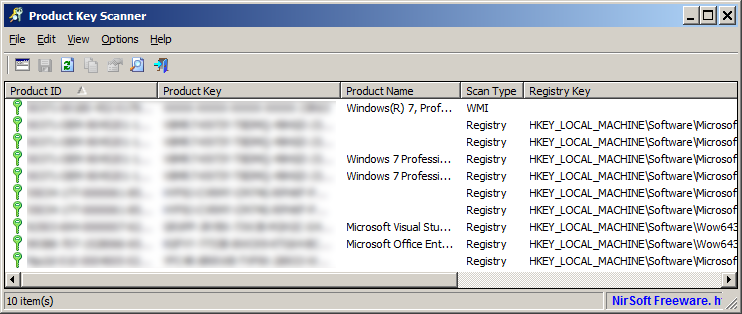
There also seems to be a utility called "NirSoft Product Key Scanner 🡵" that can do the same thing, except for any valid windows installation on any drive.
May 23, 2026
Since the board I got has a CPU already installed, even though it's just an i3, I feel like it would be wise to try booting the computer with that before making any other changes. If it turns out that the RAM doesn't work, it would be better to find out when things are (relatively) easier to put back into place.
However, upon cracking the case open and looking inside, I came to the realization that the replacement motherboard doesn't have a way for me to install the wifi card from the previous board. So, it looks like I'll have to get a PCIe wifi card. I could get an adapter that would let me use the board's M.2 slots for wifi, but given that such a thing is $9.99 on Amazon 🡵, I feel like I would be better off just getting a new one since I'm sure the card is pretty old anyway. Maybe it's responsible for me getting slower speeds on the work wifi. I found a card that seems to have the best specs for the price, a WiFi 6E card with Bluetooth 5.3 for $25 🡵 (vs the Bluetooth 5.2 most other cards seem to have.) Once I purchase that, I'll be able to return to my experimenting next week.
May 28, 2026
I think the fan speeds are a little strange with the new board, constantly going up and down by large amounts, which was starting to bug me. I looked it up, and there's a open source utility called Fan Control 🡵 that I can use to create an auto fan curve to keep the noise a little more stable and lower. It seemed to work pretty well!
September 25, 2026
Still going strong months later. Honestly, I've completely forgotten about putting it into a new case, it works just fine as is and doesn't feel like it's worth the effort to replace the case—especially when it's not my primary computer.
Finally building a proper home computer that's not just a retired Dell workstation with a graphics card crammed in would be a good project for the future though...